Search This Blog

Wednesday, 7 September 2022

IP Subnetting (VLSM) Step by Step

Main Network: 172.20.0.0/16

Required:

·         Switch 0: 225 host

·         Switch 1: 155 host

·         Switch 2: 12 host

·         Switch 3:16 host

·         Router1-Router0: 2 hosts


Switch 0: 225 host

172.20.0.0/16 >> formula host calculation: 2n-2 where n= bits borrowed from host part

Hosts=27-2 = 128-2=126 no satisfying our requirement

So, Hosts= 28-2= 256-2= 252, To satisfy the host requirement of 225 155 we must dedicate 8 bits from the last octet for hosts and the remaining bits are added as network bits.

The new subnet can be written as 172.20.0.0/16+8= 172.20.0.0/24

Switch 1: 155 host

172.20.0.0/16 >> formula host calculation: 2n-2 where n= bits borrowed from host part

Hosts=27-2 = 128-2=126 no satisfying our requirement

So, Hosts= 28-2= 256-2= 252, To satisfy host requirement of 155 we must dedicate 8 bits from the last octet for hosts and the remaining bits are added as network bits.

The new subnet can be written as 172.20.1.0/16+8= 172.20.1.0/24

Switch 3: 16 host

172.20.0.0/16 >> formula host calculation: 2n-2 where n= bits borrowed from host part

Hosts=24-2 = 16-2=14 no satisfying our requirement

So, Hosts= 25-2= 32-2= 30, To satisfy the host requirement of 16 we must dedicate 5 bits from the last octet for the host part and the remaining 3 bits are added as network bits.

The new subnet can be written as 172.20.2.0/16+8+3= 172.20.2.0/27

Switch 2: 12 host

172.20.0.0/16 >> formula host calculation: 2n-2 where n= bits borrowed from host part

Hosts=23-2 = 8-2=6 not satisfying our requirement

So, Hosts= 24-2= 16-2= 14, To satisfy host requirement of 14 we must dedicate 4 bits from the last octet for the host part and the remaining 4 bits are added as network bits.

The new subnet can be written as 172.20.2.32/16+8+4= 172.20.2.32/28

Router-Router: 2 host

172.20.0.0/16 >> formula host calculation: 2n-2 where n= bits borrowed from host part

Hosts=21-2 = 0 not satisfying our requirement

So, Hosts= 22-2= 4-2= 2, To satisfy the host requirement of 2 we must dedicate 2 bits from the last octet for the host part and the remaining 6 bits are added as network bits.

The new subnet can be written as 172.20.2.48/16+8+6= 172.20.2.48/30


Subnet Table

Required Subnet

Required Host Number

Assigned Host Number

Address

Dec Mask

Assignable Range

Switch1

225

254

172.20.0.0/24

255.255.255.0

172.20.0.1 - 172.20.0.254

Switch0

155

254

172.20.1.0/24

255.255.255.0

172.20.1.1 - 172.20.1.254

Switch3

16

30

172.20.2.0/27

255.255.255.224

172.20.2.1 - 172.20.2.30

Switch2

12

14

172.20.2.32/28

255.255.255.240

172.20.2.33 - 172.20.2.46

Router

2

2

172.20.2.48/28

255.255.255.252

172.20.2.49 - 172.20.2.50


DHCP Protocol and Load Balancing.

 Purpose of DHCP Protocol

DHCP is the dynamic host configuration protocol that is used to assign IP addresses to the host dynamically. In large networks assigning IPs to every host located at different locations becomes a very hectic job. So, we use DHCP to avoid time and resource wastage by configuring DHCP addresses.

When the host is connected to the network, they send a broadcast DHCP to discover the message, and the message is responded to by the server and offers an IP address to the host. We can configure routers and layer-3 switches as DHCP servers, or they can be used to relay the DHCP information.

We have two ways to use DHCP services in our network.

·         Distributed DHCP Services

·         Centralized DHCP Services.

Distributed DHCP Services

The DHCP services are configured on DHCP-supporting devices like routers and multi-layer switches. The main benefits of distributing DHCP services are introducing redundancy in the network and reducing the DHCP request on the network which may consume network bandwidth. But the drawback is their management may be difficult.


Centralized DHCP Services

The DHCP services are configured on a centralized dedicated server and to avoid a single point of failure normally more than two DHCP servers are configured. The centralized configuration makes the management of the IP resources and operations very easy.


Load Balancing

Load balancing is the distribution of traffic across multiple links in a network.

Load balancing is done in a network where we have sufficient links, and a good amount of bandwidth exists between the source and destination.  The necessary condition for load balancing is that the routes learned by the router must be through the same protocol.

Load balancing reduces the traffic on individual links, thus good latency and fewer delays are observed which increase the performance of the network. OSPF, EIGRP, and BGP are the protocols that support load balancing.

Load balancing is considered one of the important features of a good network design because of the following benefits.

·         It increases the reliability of a network.

·         Helps to avoid outages in case of hardware and software failures.

·         It helps to avoid overloading traffic on a single node.

·         Load distribution helps to reduce latency and ping delays.

Three-tier hierarchical Network Design

In hierarchical network design, we design the network in layers to get the below benefits

·         Network Simplification

Network architecture gets simplified as we know what we must do at a specific layer we do not need to waste on things not located at a required layer.

·         Function Concentration

We assign specific functions to specific layers and only do the relevant configurations.

·         Fault Isolation.

While troubleshooting issues we know where the fault should lie.

·         Improved Security

Different security measures can be taken at different layers depending upon their capabilities.

·         Redundancies

High-level redundancies are established to minimize the impact of hardware failure and link failure.

VLAN Implementation Methods

 VLAN Implementation Methods

Frame Filtering:  It is a VLAN implementation technique a unique identifier is placed in the header of each frame. It learns which host belongs to which VLAN by exchanging the switching tables. In a network where we have many VLANs will consume a large CPU and memory because the switch needs to process long switching tables which slows down the performance of the network.

Here we have multiple PCs connected to these switches through VLAN 1 and VLAN 2, The VLANs have been mapped against the MAC address which shows which MAC address belongs to which VLAN.

Frame Tagging VLAN

This is considered the method for VLAN configuration and is widely used, where a VLAN tag is added to a frame to identify which frame belongs to which network. The VLAN tag is added to the frame when the frames reach a switch through an access port and when this frame is going out of a trunk link, the frame tag is removed, and the frame is then delivered to the desired destination.


The port whose frames are tagged with a specific VLAN ID becomes a member of the same VLAN and the frame processing for all the frames entering from them is the same.


VLAN as Mechanism for Security

Network segmentation with VLAN break big networks into small network with their own broadcast domains and every user gets connected to its own network. The VLANs only communicate with the host within the same VLAN and can not communicate with the host in other networks. This feature introduces security in the network.

Apart from this, we can also use layer-II security features like port security features to enhance protection in the network.

VLAN Membership Static/Dynamic

VLANs can be configured as both dynamic and static.

Static VLANs:  In static VLAN a device is connected to a configured port of the switch to join a virtual LAN and become a member of the network.

·         Here the ports to VLAN are manually configured.

·         Users can connect from anywhere through a member port.

·         Time-consuming while identifying member ports in closets.

Dynamic VLANs:   Based on the MAC address of the connected device switchport assigns VLAN if the device MAC has been configured with the VLAN.

·         Making and maintaining the MAC address database can be difficult.

·         Less effort is required to connect the device to the network in closets.

·         Central notification when unknown devices are connected.

Dynamic VLANs are more susceptible to security risks as MAC Addresses can be spoofed easily but static VLANs are more secure and greater security can be added by configuring port security also.


Link State VS Distance Vector Protocols and Routing Metrics

 Compare and Contrast Link State and Distance Vector Protocols.

Link State Protocols: Link state protocols are those protocols in which every router knows the topology of the network and the cost of every link. This information is transmitted to one router from its neighboring routers via broadcasting the link state packets. Link state packet contains the information of link cost and identities of every directly connected network.

After gathering all the network information every router executes an algorithm called the Dijkstra Algorithm to find the shortest path to every network considering the link cost from the source to the destination network.

Distance Vector Protocols: These are the protocols that receive information from its directly connected neighboring routers only. Thus, they have a local view they do not know about the network topology but rather depend on the information received from their neighboring routers. The distance vector routers share their whole routing table periodically every 30 mins. When a router receives different information from the previous information it recalculates its routing table again.

Advantages and Disadvantages of Link state and Distance Vector Protocols

Link State Routing Protocols

Link State Protocols

Advantages

Dis-Advantages

Best suited for large networks due to good scalability

Link-state has smaller routing tables

and lower convergence time makes without routing loops due to the availability of a global view.

Do not share updates until any change in the network

Link state databases can be minimized by diving the network into different areas.

for a fluctuating network, updates are shared continuously which even chokes the network

Link state packets are well sequenced and show the age of the last update also.

Needs good network knowledge to implement link state routing protocols.


Distance Vector Protocols

Distance Vector Protocols

Advantages

Dis-Advantages

Less expertise is required for implementation

Slow convergence time, routing updates are shared after every 30 s.

Less resource consumption like low CPU and memory is required

Not suited for large networks due to slow convergence and limit to 15 hops only

Suited for small networks as less bandwidth is required to send routing updates as the size of packets is small

Routing loops can occur due to slow convergence during a network change.


Routing Loop

The routing loop is one of the major issues that may occur in a network. In a routing loop, a packet is continuously routed through the network without delivering it to a destination. Thus, the packet routes in a circle endlessly and can prove damaging for the network by consuming network bandwidth unnecessarily.

If a packet enters a network with loops and loops are already consuming a good part of the bandwidth, then the new packet to a different network will also face delays and high latency. If the packet belongs to the already looped network, then the packet will route in a loop contributing to destroying the network performance.

We have a few methods to avoid routing loops, as mentioned below.

·         Maximum Hop Count

·         Spilt Horizon

·         Route poisoning

·         Hold down timers.

These technologies are already existing in the protocols are we can fine-tune a few parameters like manipulating the hold-down timer etc. to avoid routing loops. 

Routing Protocol Path Selection.

 Every protocol has a different metric for the best path selection and a metric is a value that every protocol assigns to every path depending upon its usefulness.

The routing protocol RIP has a metric of Hop count which means that it does not check the quality of a link, it just checks the least number of routers between the source and destination networks.

In the case of OSPF routing protocol, it must do nothing with a number of hops, it checks the bandwidth and delays on a link, or called the cost of a link. It selects the path with the least cost.

Therefore, the metric of protocols is not comparable and under the same conditions, they select different paths.

DESIGN & IMPLEMENTATION OF A DATA CENTER NETWORK

1.      Introduction

 This task is a data center network design for “Future Technologies” an imaginary company. The company is having three offices located in three different regions of the country. The regions are named North, and South Regions, and the Head Quarter. The company is providing different IT services to its clients; therefore, they have deployed different servers like cloud hosting servers, Storage Servers, FTP Servers, Email Servers, DNS, and Application Servers.

The data centers have been deployed in different regions to provide high-speed and high-capacity services to their customers at very low latency. Meanwhile, it is a challenge for the company to deploy expert resources in all regions. Therefore, the company has got services of an ISP to connect the data centers with their Head Quarter for centralized Management.       

Different technologies and media have been used to make the data center a reliable network that clients can trust and buy services of this company. We have designed a highly scalable and reliable network to maximize the network availability 100%.

 Network Topology Diagram

 The network has been designed to provide services to clients at a very fast pace and up to customer satisfaction. High-speed interfaces and physical media have been used to minimize the limits of bandwidth and latency.


All connections with ISP are based on optical fibers and the theoretical capacity of fiber is unlimited so we have a very good benefit even when the traffic increases in the future. We need to enhance the capacity of a few pieces of equipment, but we don’t need to change the ISP connection when expansion is required.

We have paid special attention to the security and network surveillance in the data center to record all activities and ensure security. Therefore, CCTV Cameras have been installed, all doors are access control system managed, and only authorized people can enter the data center.  Fans and lights are also integrated with the IoT server for centralized management.    

This reduction is highly reliable, secure, and low cost due to the control of temperature lights, etc.  Another feature involves high redundancies and scalability.   

3.1 North Data Center Network       

Below is the network designed for the North region data center where we can see multiple servers installed. These are the Web server, DNS Server, Email Server, and application server. We have connected the end servers with two uplink interfaces for high availability. If one of the paths gets down the network will remain working, and no outage can be observed.      

The IoT devices are connected through Wi-Fi links over a separate VLAN. An access point has been connected to provide an SSID/Password to get the device connectivity.  


3.2 South Data Center Network     

The south Data center is also a robust design with some other servers that are IOT Server, Storage Server, FTP Server, and Cloud Server. These Servers are used to provide services to company clients. All the management IoT devices are being managed devices through the centralized IoT Server.       


  3.3 Head Quarter Network Design-1

The company is having different department at the head Quarter for management of the company resources and the IT department looks at overall networks. Below are the departments located on one floor in the headquarters.


  3.4. Head Quarter Network Design-2

This is the design for H/Q floor-2 showing the three departments and the IoT device connecting to provide automation services to the staff and company.


4 Network Design Features

5 IP Address Planning

IP address planning is one of the most important steps of a good network design. We have used private IP addresses for all the internal networks and all the connectivity with the ISP are public IP addresses. 

All the subnets for different departments are class “C” /24 network that is aimed for future expansion support. Below are the different.

VLAN Name

VLAN ID

IP Subnet

IOT_NDC

VLAN 10

192.168.10.0/24

Servers_N

VLAN 20

192.168.20.0/24

 IOT_SDC

VLAN 30

192.168.30.0/24

Server_S

VLAN 40

192.168.40.0/24

IT_Admin

VLAN 50

192.168.50.0/24

Marketing

VLAN 60

192.168.60.0/24

Sales

VLAN 70

192.168.70.0/24

 IOT_H/Q

VLAN 80

192.168.80.0/24

Accounts

VLAN 90

192.168.90.0/24

HR

VLAN 100

192.168.100.0/24

Management

VLAN 110

192.168.110.0/24

Point to Point

Router-MLS interfaces

10.10.10.0/28

Point to Point

Router-ISP

182.182.0.0/28


Each VLAN represents a different network and all the IP addresses from that network will be having same network IP and different host IPs. The above-designed network is a highly flexible network where we are using two different IP addressing schemes. Routers have been configured as the DHCP server to provide the dynamic IP addresses to the H/Q network. All the servers have been assigned static IP addresses.

Network Technologies

The network technologies that have been used in the topology are listed below. The selection of these technologies and protocols has been made according to the requirement of this network design.

  • ·         Basic Device Hardening.
  • ·         Layer-II Port Security.
  • ·         VTP Protocol Configuration
  • ·         VLAN Configuration
  • ·         Layer-III IP Routing
  • ·         Switchport Trunking
  • ·         DHCP Configuration on Layer-III Switches.
  • ·         Ether Channel Configuration.
  • ·         HSRP Protocol Configuration.
  • ·         OSPF Routing Protocol Configuration
  • ·         Telnet Configuration for Remote Management.
  • ·         WLAN IoT Device Configuration.
  • ·         IOT Server Configuration
  • ·         Web Server Configuration
  • ·         DHCP Server Configuration
  • ·         Email Server Configuration

6.1 Basic Device Hardening

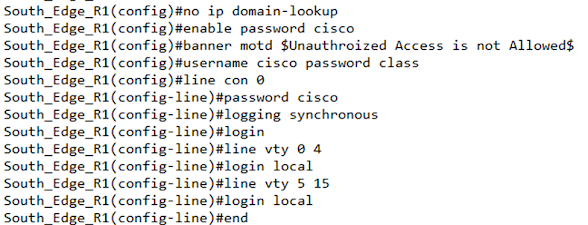
Device hardening is referred to the basic security parameters of network devices to establish security against unattended access and damaging network integrity. We have secured all lines to access a switch or router and the configuration is done as below.


The above configuration has been copied to all switches and routers which shows that we have configured Banner, enable password, line console password, line vty password, and remote accesses over telnet.

6.2 Layer-II Port Security.

Port security is configured on the layer II switches to protect network access from unauthorized devices. We have allowed only the currently connected devices any other devices than this will not be allowed to connect with a switch and the administrator will be alerted regarding the activity.

6.3 VTP Protocol Configuration

VTP is a VLAN Trunking protocol for making the VLAN configuration process fast by making one of the switches as a server and the other switches' clients. Any VLAN configured on the server will also be created on the clients automatically.

VTP Server 


VTP Client

6.4 VLAN Configuration

VLANs have been configured in the network to divide the network into segments that introduce many benefits in terms of security, scalability, and resiliency. Below VLANs have been configured on the switches.


6.5 Layer-III IP Routing

The layer-III Ip routing has been enabled on the multi-layer switches for enabling inter-VLAN communication. Below is the configuration done for this purpose.


6.6 DHCP Configuration

We have configured DHCP on the multi-layer switches to provide redundancy at the first hop. The configuration has been done as below. All IPs that we don’t want the DHCP server to assign have been excluded.


6.7 Ether Channel Configuration.

Ether channels have been configured to enhance bandwidth and redundancy. Configuration has been done as below. 

6.8 HSRP Protocol Configuration.

We configure HSRP for providing redundancy at the first hop by configuring the Host standby routing protocol (HSRP). Configuration for this has been done at the multi-layer switches. One of the switches is working as the Active switch and the other switch is acting as the Back-Up switch.


6.9 OSPF Routing Protocol Configuration

OSPF is the most loved enterprise network protocol, we have configured OSPF on all routers to advertise the connected routes of the routers. The configuration has been done as below.


6.10 Telnet Configuration for Remote Management.

Telnet is used for remote management of network devices. We have created a local user and allowed it on the VTY lines for remote access. Devices can be accessed over telnet as below.


6.11 WLAN IoT Device Configuration.

For the IoT devices, we need to configure them by adding the server IP to each device so that the server would be able to manage devices. Below WLAN & Server related configuration is done on the IoT devices.


7 Service & Connectivity Test

In this section, we will verify the connectivity test and verification of the configured services on the network.

IT_Admin_PC  to North  Servers Ping  

The ping is successful for all the servers of North Data Center.


Accounts PC- North Datacenter

All servers from this region are also accessible from the headquarter.


*****************************************************************************

                    Packet Tracer file will be provided upon request

*****************************************************************************


OSPF Operation and Route Selection - A detailed discussion

  OSPF Routing Protocol   Abstract:               The report discusses the OSPF Routing protocol and its implementation in networks. T...